


Let me be honest with you. When I first heard the phrase “keyword research,” I pictured some complicated dashboard with graphs and numbers that only SEO nerds could decipher. I nearly closed the tab and forgot the whole thing. Sound familiar?
Here’s the thing — keyword research is just figuring out what words real people type into Google when they’re looking for something. That’s it. The tools and the spreadsheets come later. First, you need to understand the idea. And once it clicks, it actually feels kind of obvious.
This guide is for you if you’ve just started a blog, launched a small business website, or you’re managing content for someone and quietly panicking because you don’t know where to begin. No jargon. No fluff. Just the stuff that actually matters.
Why Keyword Research Even Matters
Imagine you bake incredible sourdough bread and you write a blog post titled “My Fermentation Journey.” You’re proud of it. You pour your heart into it. And then… nobody reads it. Not because the content is bad, but because nobody typed “my fermentation journey” into Google. They typed “how to make sourdough bread at home.”
That’s the whole game. You could write the best content on the internet, but if you’re not using the words your audience is actually searching for, Google won’t connect the two of you. Keyword research is just building that bridge.
“The goal isn’t to trick search engines. It’s to speak the same language as the people you’re trying to help.”
In reality, most beginners skip this step entirely or guess at it. That’s why their pages sit on page five of search results, collecting digital dust.
Understanding Search Intent (This Is the Big One)
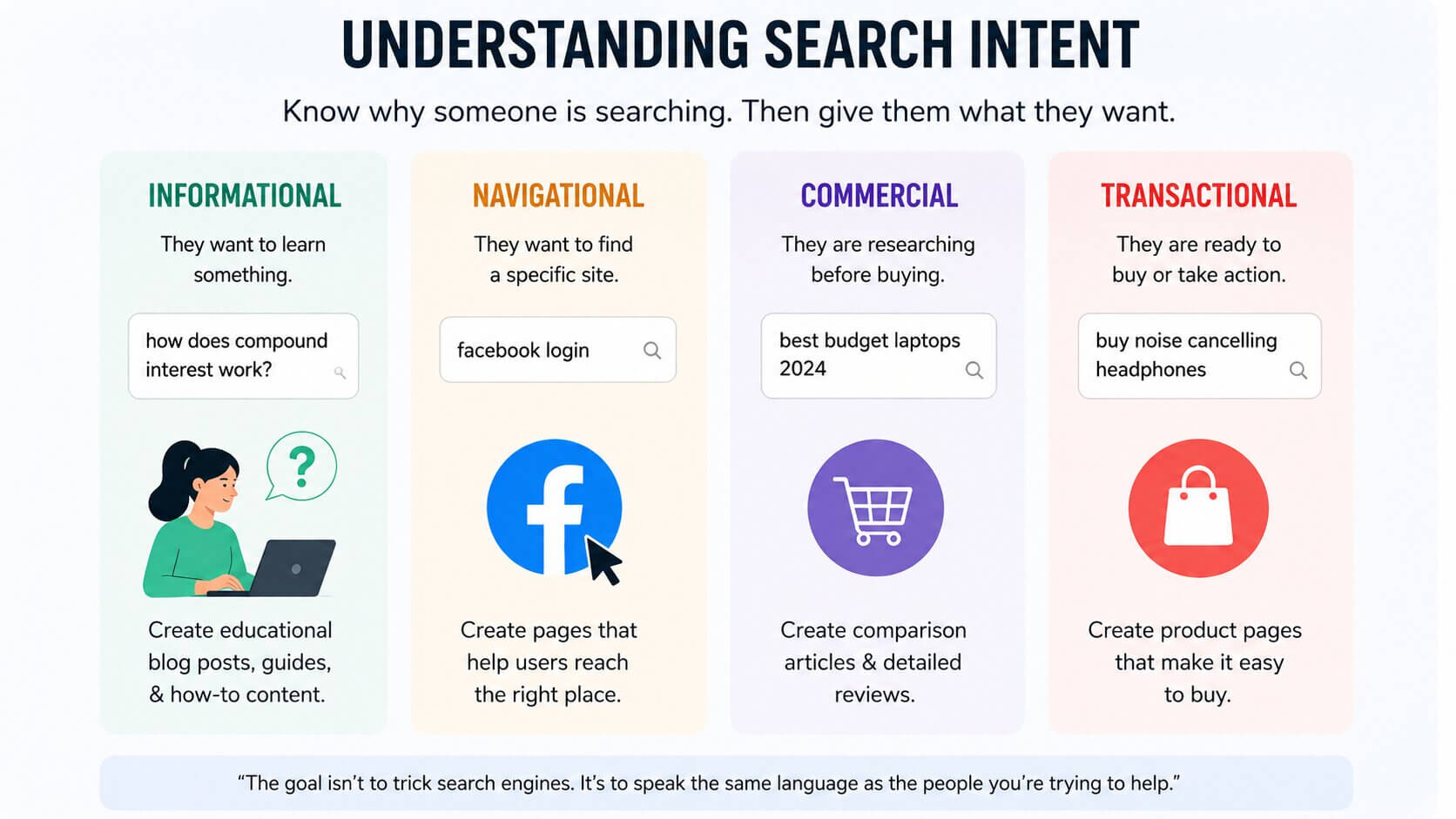
Before you even look at a keyword tool, you need to understand search intent — why someone is searching for something. There are basically four types:
- Informational: They want to learn something. (“How does compound interest work?”)
- Navigational: They’re trying to find a specific site. (“Facebook login”)
- Commercial: They’re researching before buying. (“Best budget laptops 2024”)
- Transactional: They’re ready to buy or do something. (“Buy noise-cancelling headphones”)
This matters because if someone types “best running shoes” they’re probably comparing options — not ready to buy yet. So writing a hard-sell product page for that keyword? Wrong move. A helpful comparison article? Much better.
Always ask yourself: what does someone actually want when they type this? Then give them exactly that.
Short-Tail vs. Long-Tail Keywords
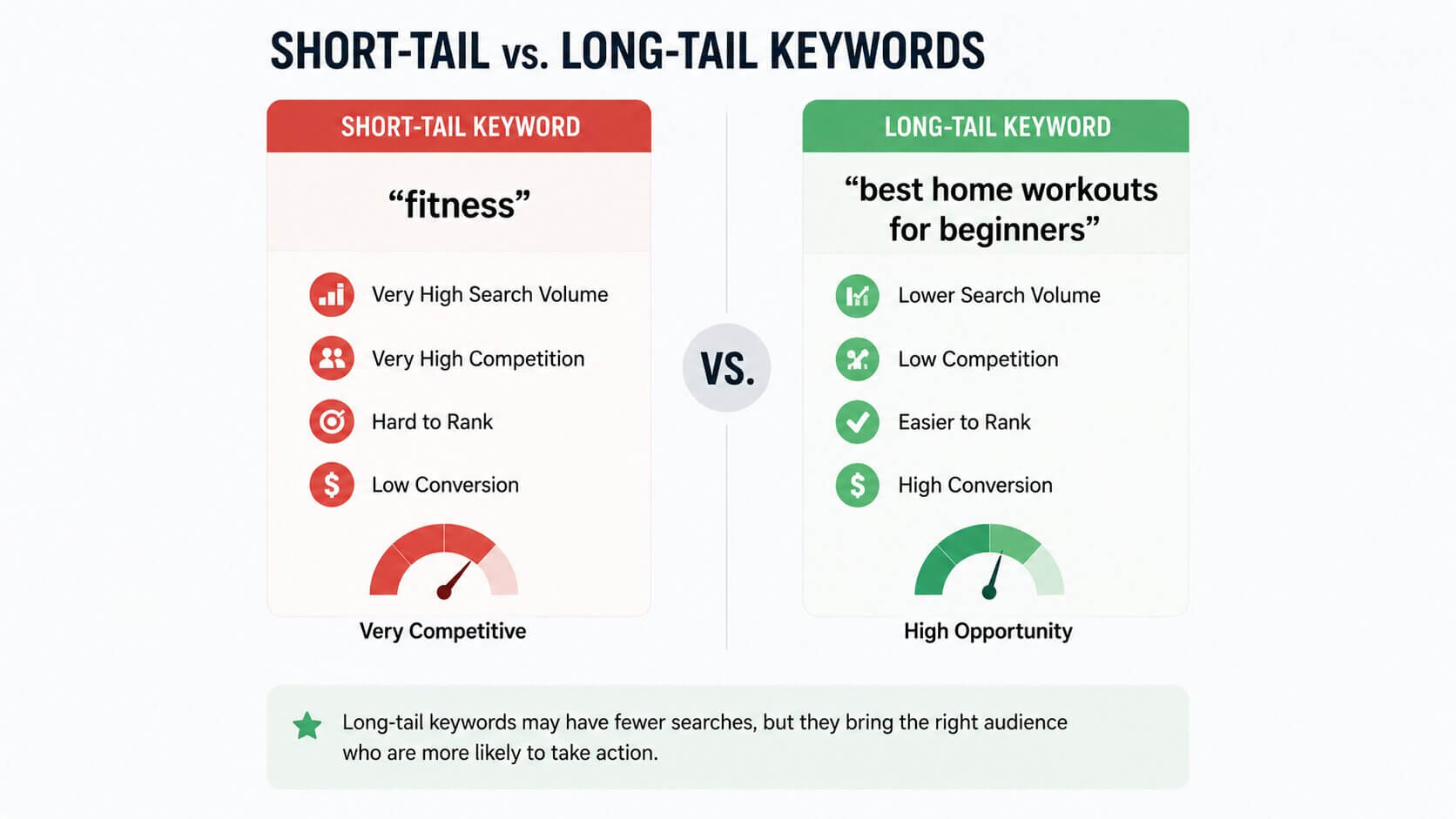
You’ll hear these terms constantly, so let’s get them out of the way.
Short-tail keywords are broad, one-to-two word phrases. Think “coffee,” “fitness,” “travel tips.” Millions of people search these every month. Sounds great, right? The problem is — so does every major website on the internet. Competing against Forbes or Wikipedia on the keyword “fitness” as a beginner? Not going to happen.
Long-tail keywords are longer, more specific phrases. “Best coffee beans for cold brew under $20.” Fewer people search for this — maybe 200 a month — but the people who do are highly specific in what they want. And crucially, the competition is way lower. You can actually rank for these.
Quick Example
Take Sarah, who runs a small home bakery. If she targets “cake recipes,” she’ll never beat the big food blogs. But “moist chocolate cake recipe without buttermilk”? That’s a long-tail keyword with real intent, manageable competition, and people who genuinely need that recipe. Sarah writes a great post, shows up on page one, and suddenly gets 300 visitors a month from one article. That’s long-tail in action.
My personal opinion? Long-tail keywords are criminally underrated by beginners. Everyone chases the big vanity numbers, but the small, specific searches add up fast — and they convert better too.
How to Actually Find Keywords (Step by Step)
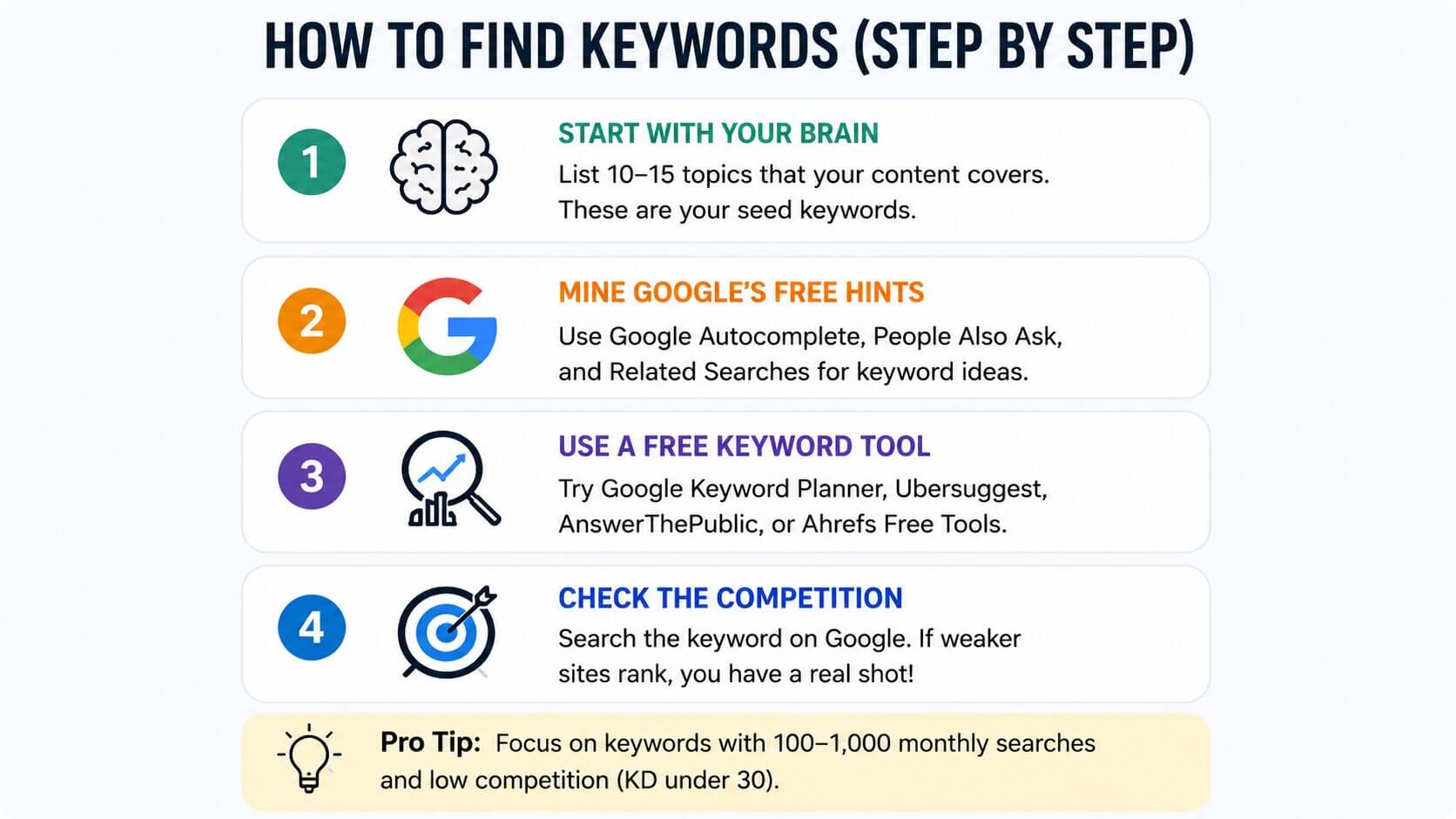
Step 1 — Start With Your Brain
Seriously. Before opening any tool, write down 10–15 topics that your content covers. If you’re a personal finance blogger, maybe that’s: budgeting, saving money, credit cards, investing for beginners, side hustles, debt payoff. These are your “seed keywords” — the roots from which everything else grows.
Step 2 — Mine Google’s Free Hints
Go to Google and start typing one of your seed keywords. Don’t hit enter — just look at the autocomplete suggestions. Those are real searches from real people. Write them down. Then scroll to the bottom of the results page and check “People also ask” and “Related searches.” You’ve just found dozens of keyword ideas without spending a penny.
Step 3 — Use a Free Keyword Tool
Now bring in some data. A few tools worth knowing:
- Google Keyword Planner — Free, straight from Google. Gives you monthly search volumes. Requires a free Google Ads account.
- Ubersuggest — Has a generous free plan. Good for beginners.
- AnswerThePublic — Shows you questions people ask around a topic. Great for blog post ideas.
- Ahrefs Free Keyword Generator — Limited but surprisingly useful without a subscription.
Step 4 — Check the Competition
Type your keyword into Google and look at the first page. If you see major news outlets, huge brands, and Wikipedia — that keyword is too competitive for now. If you see smaller blogs, forums, or Reddit threads? That’s a green light. You have a real shot at ranking.
The Numbers You Actually Need to Know
Tools throw a lot of numbers at you. Here are the only ones that matter when you’re starting out:
- Search Volume: How many times per month people search this keyword. For beginners, targeting 100–1,000 searches/month is a sweet spot. Not so small it’s pointless, not so big you’ll never rank.
- Keyword Difficulty (KD): A score (usually 0–100) showing how hard it is to rank. Aim for under 30 when you’re just getting started. Under 20 is even better.
- CPC (Cost Per Click): What advertisers pay to show up for that keyword. High CPC usually means commercial intent — people searching are ready to buy. Good to know if you’re monetizing.
Don’t get obsessed with the numbers though. A keyword with 150 monthly searches and low competition that perfectly matches what you write about is worth more than a 10,000-search keyword you’ll never rank for.
A Real-World Walkthrough
Let me walk you through a quick example. Say you run a blog about indoor plants.
Seed keyword: indoor plants. Search volume: massive. Competition: brutal. Move on.
You type “indoor plants” into Google autocomplete and see: “indoor plants for low light apartments.” That’s interesting. You check it in Ubersuggest — 1,300 searches/month, difficulty score of 18. You Google it and the first page has a couple of mid-size blogs. That’s your keyword.
You write a focused, genuinely helpful article called “The 9 Best Indoor Plants for Low Light Apartments (That Actually Survive).” You use that phrase naturally in your title, first paragraph, and a couple of subheadings. You don’t stuff it awkwardly everywhere — just write like a normal human who happens to know plants.
Three months later? You’re on page one. Traffic starts coming in. That’s the process.
Common Beginner Mistakes to Avoid
- Targeting one keyword per page, not per site. Each page should target one primary keyword and a few related ones. Don’t try to rank one page for twenty different things.
- Ignoring search intent. Match your content format to what the searcher actually wants.
- Keyword stuffing. Writing “best indoor plants for low light apartments” fourteen times in one article will get you penalized, not ranked. Write naturally.
- Only going after high-volume keywords. You’ve heard this already, but it bears repeating — go long-tail, especially at the start.
- Researching once and never revisiting. Trends shift. New questions emerge. Revisit your keyword strategy every few months.
Frequently Asked Questions
How many keywords should I target per blog post?
One primary keyword and two to four closely related secondary keywords. Any more than that and you’ll start losing focus. Keep it tight.
Do I really need to pay for keyword tools?
Not at first. Google Keyword Planner, Ubersuggest’s free tier, and good old Google Autocomplete will get you surprisingly far before you need to invest in anything premium.
How long does it take to rank for a keyword?
Honestly? Anywhere from a few weeks to six months, depending on your site’s authority and the competition. New sites take longer. Be patient and keep publishing.
Can I do keyword research for a local business?
Absolutely. Just add your city or neighborhood to keywords. “Plumber in Austin TX” or “best ramen downtown Chicago” — local intent is powerful and often has less competition than broad national terms.
What if a keyword I want has zero search volume?
It could mean the tool just doesn’t have data on it, or it’s genuinely too niche. Sometimes those zero-volume keywords still bring traffic — especially if they’re highly specific questions. Use judgment. If you’d search for it yourself, someone else probably would too.
You’ve Got Everything You Need to Start

Keyword research doesn’t have to be overwhelming. You’re not trying to hack an algorithm — you’re just trying to understand what your audience is looking for and then give it to them, clearly and helpfully. Start simple. Pick a niche topic you genuinely know well. Find a long-tail keyword with low competition. Write something useful. Repeat.
The people who succeed at this aren’t necessarily the ones with the biggest budgets or the fanciest tools. They’re the ones who stay consistent and actually pay attention to what their readers need. You can absolutely be one of those people.
Now go find your first keyword. It’s out there waiting.